After the party: how to bring your crowd back
The hour after your event ends is the best time to bring people back. How to use the after-event message and the event report to plan your next edition.

In this article
To bring your crowd back, talk to them right after the party, while the memory is still good: say thanks, tell them where the photos will be and when the next one is. On Baila, the after-event message does this for you, by e-mail, 1 hour after the event ends, and the report shows who didn't come.
Why the hour after the event matters
Right after the party, people still have the music in their heads, they are posting stories and tagging friends. A message that lands at that moment tends to be opened in a different mood: it is the rest of the night, not one more ad. A week later, they have moved on.
| Moment | What people tend to do | What the message can offer |
|---|---|---|
| Right after it ends | Look for photos, post stories | Where and when the photos go up, and your Instagram |
| The next day | Talk about the night with friends | The date and link of the next event |
| A week later | Already thinking about the next outing | Not much: the memory has cooled down |
The message doesn't replace your promotion. It uses the best moment with the people who already liked you.
What to write in the message
A good message fits in two or three sentences and has one clear invitation. At Baile do Arrasta-Pé, a sample forró night, the message read:
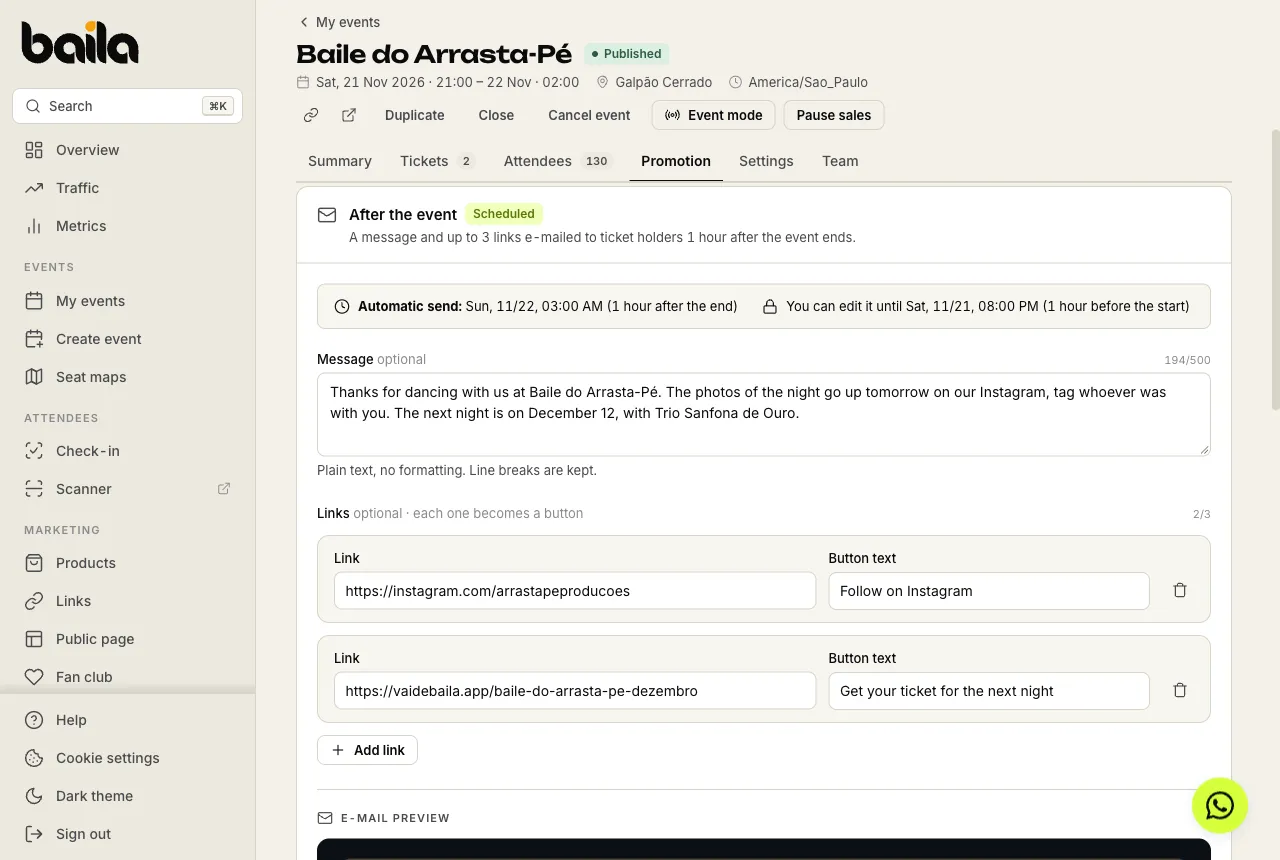
Thanks for dancing with us at Baile do Arrasta-Pé. The photos of the night go up tomorrow on our Instagram, tag whoever was with you. The next night is on December 12, with Trio Sanfona de Ouro.
And two buttons: Follow on Instagram and one to get a ticket for the next night, linking straight to the December event page.
A few ideas that tend to work:
- A thank-you with the event's name. It shows this is not a generic e-mail.
- Where and when the photos or video go up. It's what people look for afterwards.
- The next date, with a link. People who enjoyed it buy right away, while they are still excited.
- A quick survey. Two questions are enough to adjust the next edition.
Write it before the event, in the Messages step of the event wizard or in the Promotion tab. You can change it until 1 hour before the start, and the Send me a test button shows you how the e-mail arrives.
Who receives it and how to send it on WhatsApp
The e-mail goes to everyone holding a valid ticket when it is sent, checked in or not, one e-mail per person. Anyone who chose to stop receiving messages from organizers is left out, and tickets, receipts and order notices keep arriving for everybody as usual.
If your crowd lives on WhatsApp, the dashboard helps you follow up after the event. The ready text is the same message as the e-mail, with the person's first name; you adjust it on WhatsApp before sending.
| Audience | How to reach them | What to adjust before sending |
|---|---|---|
| People who came | Came filter, Open WhatsApp button | A thank-you for the night |
| People who missed it | Missed filter, Open WhatsApp button | "We missed you", plus the next date's link |
| The event group | Copy text and paste it in the group | Nothing: it's the same message as the e-mail |
WhatsApp opens with the person's number and the text ready. You review it and send it from your own number.
How to use the report to plan your next edition
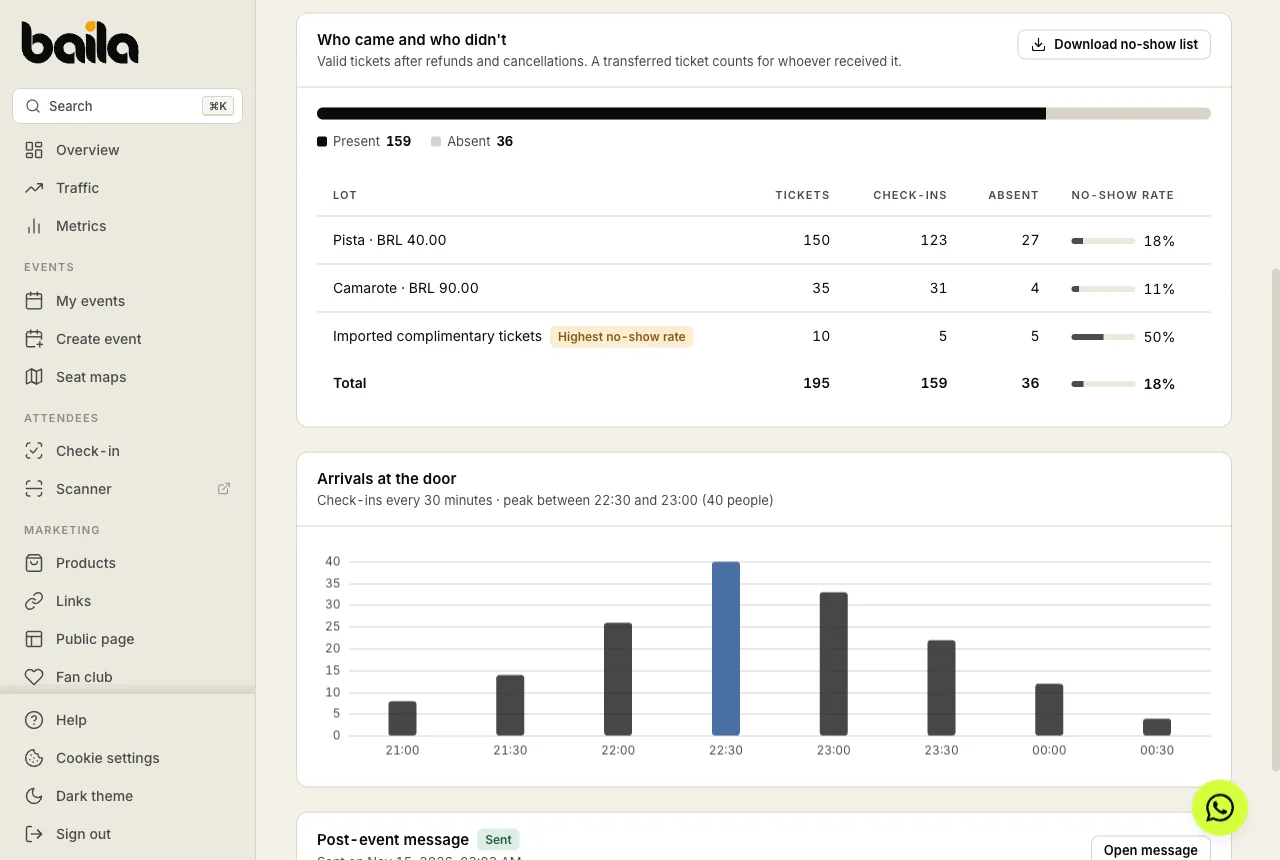
The report shows up in My events, under the View report button, as soon as the event ends. For Baile do Arrasta-Pé, it showed 82% attendance: 159 of 195 tickets checked in. The table by tier showed an 18% no-show rate on Pista (the dance floor), 11% on Camarote (the VIP area) and 50% among imported complimentary tickets. The numbers are illustrative.
A few possible readings, to adapt to your reality:
- Complimentary tickets with many no-shows. It's worth confirming attendance before sending the guest ticket, or sending it closer to the date.
- One tier with more no-shows than the others. Tickets bought very early tend to have more drop-outs. A reminder the day before can help.
- Peak arrival time. The arrivals chart shows the busiest half hour: in the example, 40 people between 22:30 and 23:00. That's when to reinforce your door staff and to think about when your main act starts.
And the people who didn't come? The Download no-show list button downloads a spreadsheet of everyone who bought and never checked in. They are the easiest crowd to win for the next one: they already wanted to go.
Frequently asked questions
Do I need to be online for the message to go out?
No. If the message is written by 1 hour before the start, Baila sends it on its own, 1 hour after the end. With no message written by then, nothing is sent.
Do people who didn't check in get it too?
Yes. The message goes to everyone with a valid ticket. If you want to talk only to people who missed it, use the Missed filter and send it on WhatsApp.
Does the report work without check-in?
Partly. Sales, revenue and conversion show as usual, but attendance and no-shows depend on check-in at the door. Without check-in, the report says there is no way to tell who came.
Sources
- How to message your ticket holders after the event, Baila help center, accessed November 16, 2026.
- Event report: who came, who didn't and how sales went, Baila help center, accessed November 16, 2026.
- How to stop receiving messages from organizers, Baila help center, accessed November 16, 2026.