How to track landing page performance
See each landing page's visits, promoter link clicks, ticket and product sales, where the visits came from and how sales through promoter links are credited.
This is done in the organizer dashboard
Every landing page has a Performance tab, with the visits, sales and revenue the page brought in, where people came from and which campaigns and promoter links worked. Counting is automatic from the moment you publish.
Where to find it
Under Marketing > Landing pages, open the page and click the Performance tab. The landing page list also shows each page's Visits (30 days) and Sales (30 days).
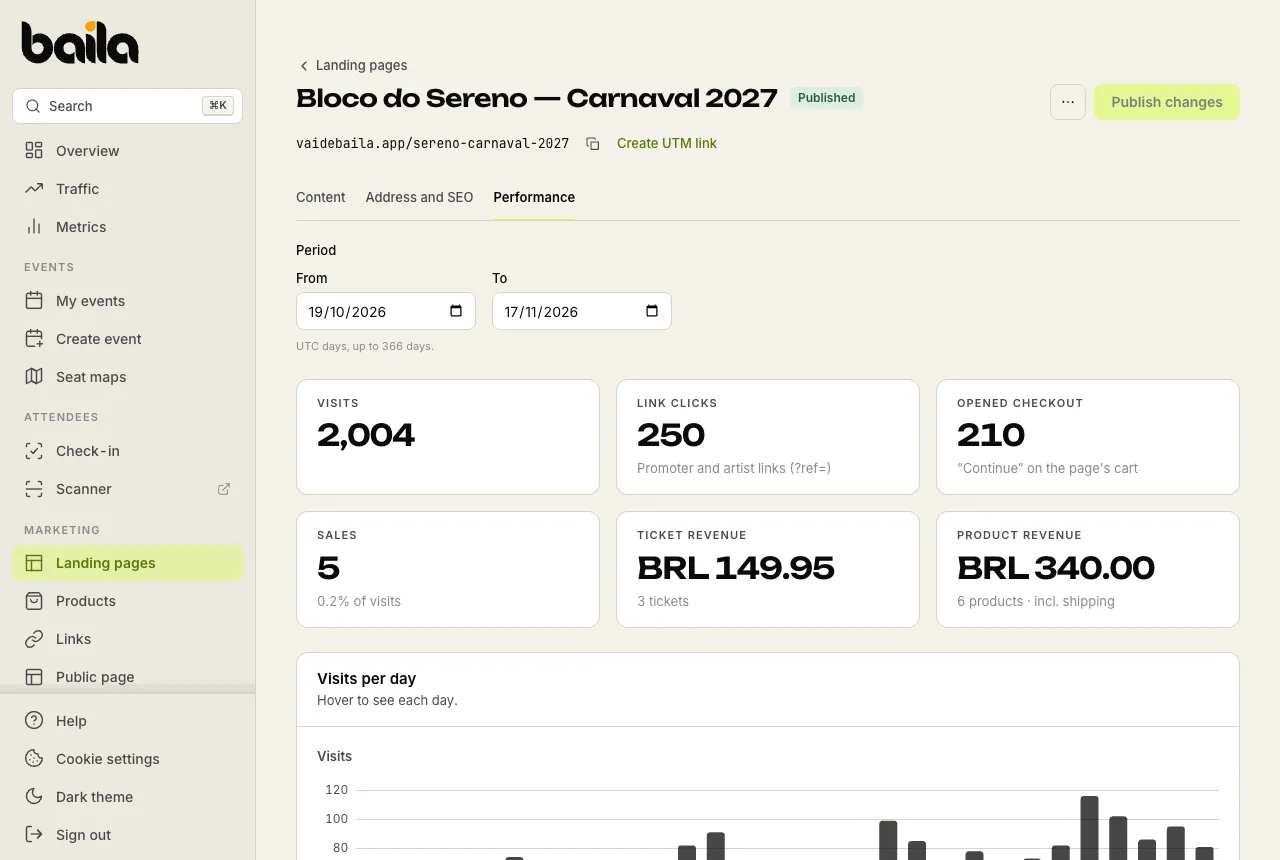
Under Period, pick the From and To dates (up to 366 days). Days are counted in universal time (UTC), not your local time.
What each number means
| Metric | What it counts |
|---|---|
| Visits | How many times the page was opened. If the same person opens it several times in a row, it counts as one visit. Bots don't count. |
| Link clicks | Page opens through promoter and artist links. |
| Opened checkout | How many times someone tapped Continue on the page's cart. |
| Sales | Orders placed through the page, with the share of visits. |
| Ticket revenue | The value of tickets sold through the page and how many tickets. |
| Product revenue | The value of products sold through the page, shipping included, and how many units. |
Below the cards, Visits per day charts the period, and Where visits came from shows where people came from: Instagram, WhatsApp, Google, promoter links, campaigns, no source (a typed or pasted link) and others.
Campaigns and promoter links
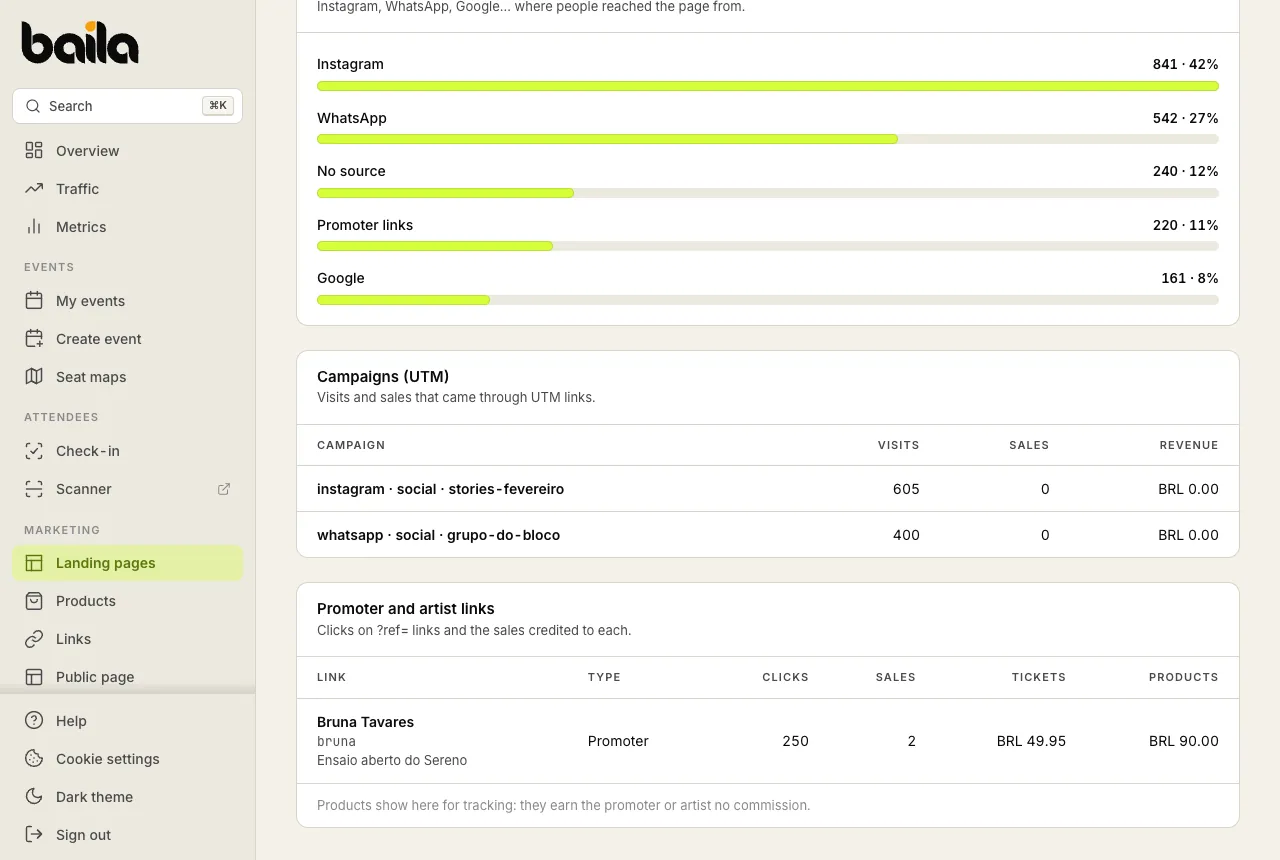
- Campaigns (UTM): visits and sales that came through UTM links, one row per campaign. Create these links in the Link builder, choosing Landing page as the destination.
- Promoter and artist links: each promoter or artist link that brought people to the page, with its Clicks, the Sales credited to it and the amounts in Tickets and Products.
How sales are credited to promoters and artists
A promoter's or artist's link to the landing page carries their code at the end, such as vaidebaila.app/sereno-carnaval-2027?ref=bruna. The code has to belong to a promoter or artist of one of the page's events; a code from another event is not counted.
| What the buyer bought | Who gets the credit |
|---|---|
| Tickets (with or without products) | Through a promoter's link, the sale counts as usual: their coupon is applied automatically at checkout, the sale shows in their performance for the event and earns the agreed commission on the tickets. Through an artist's link, the sale counts in the artist's sales. |
| Products only | The sale shows only here, on the link's row under Promoter and artist links, for tracking. It earns no commission and doesn't show in the event's reports. |
Products never earn a commission, not even when they are on the same order as a ticket. Commissions, coupons and discounts apply to tickets only.
Frequently asked questions
Do landing page visits show on the Traffic screen? No. The Traffic screen shows visits to your event pages. Landing page visits live on the page's Performance tab. Tickets sold through the landing page count in the event's sales, like any other sale.
How does a promoter share the landing page with their code? In the Link builder, choose Landing page as the destination and fill in Promoter or artist code (?ref=) with their code. Send the finished link to the promoter to share.
When does counting start? On the day the page is published. A draft page doesn't count visits.
Related articles
How to create a landing page for your campaign
Build one page per campaign, with a cover, dates, products, a gallery and FAQs, at an address of your own. Buyers get tickets and products in one cart.
How to message your ticket holders after the event
Write a short message with up to 3 links and Baila e-mails it to ticket holders 1 hour after the event. Then follow up on WhatsApp.