How to create UTM links with the Link builder
Create one link per channel (Instagram, WhatsApp, email…) that leads to an event, a label or a landing page, and see where your sales came from.
This is done in the organizer dashboard
The Link builder is an organizer dashboard tool that creates a link with per-channel UTM parameters. The link can lead to an event, a label or a landing page. Instead of one link used on Instagram, WhatsApp and email (which would all be mixed together in the report), you create one per channel and find out exactly where the sales came from.
Without a promoter code, the generated link is a plain link carrying only the UTMs: it does not bring a promoter's coupon along. Each promoter has their own affiliate link, on the My Links page of the promoter dashboard, which already carries their coupon plus utm_source=promoter and utm_medium=affiliate. See the article at the bottom of the page.
Step by step to create a link with UTMs
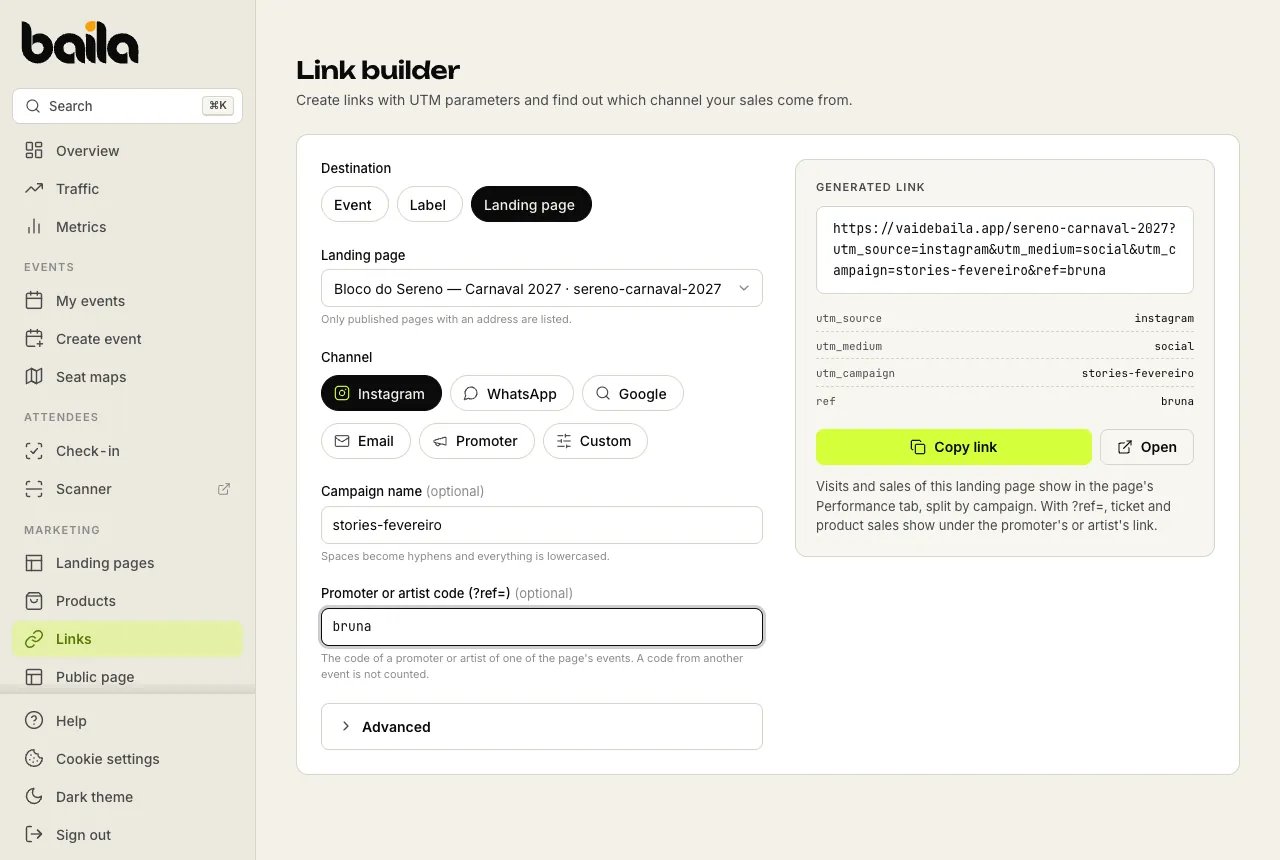
In the side menu, under Marketing, click Links (or go to dashboard.vaidebaila.app/link-builder). The screen is called Link builder.
Under Destination, choose where the link leads: Event, Label or Landing page. Then pick which one. Only labels with an address and published landing pages with an address are listed.
Under Channel, choose where you will share the link: Instagram, WhatsApp, Google, Email, Promoter or Custom. Each option fills in that channel's utm_source and utm_medium; with Custom, you fill in the source and medium under Advanced.
If you want, fill in Campaign name (optional), for example birthday-sp-2026. It becomes the utm_campaign and separates different campaigns on the same social network. Spaces become hyphens and everything is lowercased: Birthday SP 2026 becomes birthday-sp-2026.
If a promoter or artist will share the link, fill in Promoter or artist code (?ref=) with their code (optional). On an Event link, the code is credited just like on the promoter's link to the event page: ticket sales count for them. For Label and Landing page, see the rule below.
The link shows up under Generated link. Click Copy link and it goes to your clipboard, ready to share.
Links to a label or a landing page
- Label: the link leads to the label's address, which shows the next edition. The ?ref= code has to belong to a promoter or artist of one of the label's editions.
- Landing page: visits and sales show on the page's Performance tab, split by campaign. The ?ref= code has to belong to a promoter or artist of one of the page's events; a code from another event is not counted. With it, ticket sales count as usual: through a promoter's link, their coupon is applied automatically at checkout and they earn the agreed commission; through an artist's link, the sale counts in the artist's sales. A products-only sale shows on the link for tracking, with no commission. See how to track landing page performance.
On a landing page, the Create UTM link shortcut below the title opens the builder with that page already selected.
Each channel fills in a source and a medium (utm_source / utm_medium): Instagram = instagram / social, WhatsApp = whatsapp / social, Google = google / cpc, Email = email / email, and Promoter = promoter / referral. Use the same channel across events so you can compare performance over time.
Advanced: source, medium and content
Click Advanced to see the fields the channel filled in, Source (utm_source) and Medium (utm_medium), and adjust them by hand. With Custom, they start from the last channel you picked.
Content (utm_content) is there too, and optional: it tells apart pieces of the same campaign, such as the promoter's or the post's name, and stays on the link even if you switch channels afterwards.
Where to see the results
In the event's Metrics, the Conversion channels card shows the confirmed orders from each source since sales started:
- Sources: orders and attributed revenue by source and medium, that is, which network each purchase came from.
- Campaigns: orders and attributed revenue by campaign, when you fill in Campaign name.
This data helps you decide where to spend your time: if WhatsApp sells 5× more than Instagram, it's worth focusing on direct messages.
The dashboard's Traffic screen also shows the visits and orders that came through each link: see how to track event traffic.
Related articles
How to track event traffic: visits and sales
See how many people opened your event page, where they came from (Instagram, WhatsApp, Google, promoter links, UTM campaigns) and which channels sold tickets.
How to create a landing page for your campaign
Build one page per campaign, with a cover, dates, products, a gallery and FAQs, at an address of your own. Buyers get tickets and products in one cart.