How to refund the products of an order
Give back the products and the shipping fee without cancelling the tickets, or refund the whole order. Either way, the stock goes back on sale.
This is done in the organizer dashboard
On an order with a ticket and a product, you can give back just the product part: the amount of every product on the order plus the shipping fee goes back to the buyer, and the tickets stay valid. Use it when the t-shirt didn't fit, a size was missing or you couldn't deliver. To undo everything, refund the whole order.
How to refund only the products
Under Products > Orders, open the order. You can also reach it from the products shortcut on the event's Attendees tab.
Click Refund products. The window lists each product, the shipping fee and how much goes Back to the buyer.
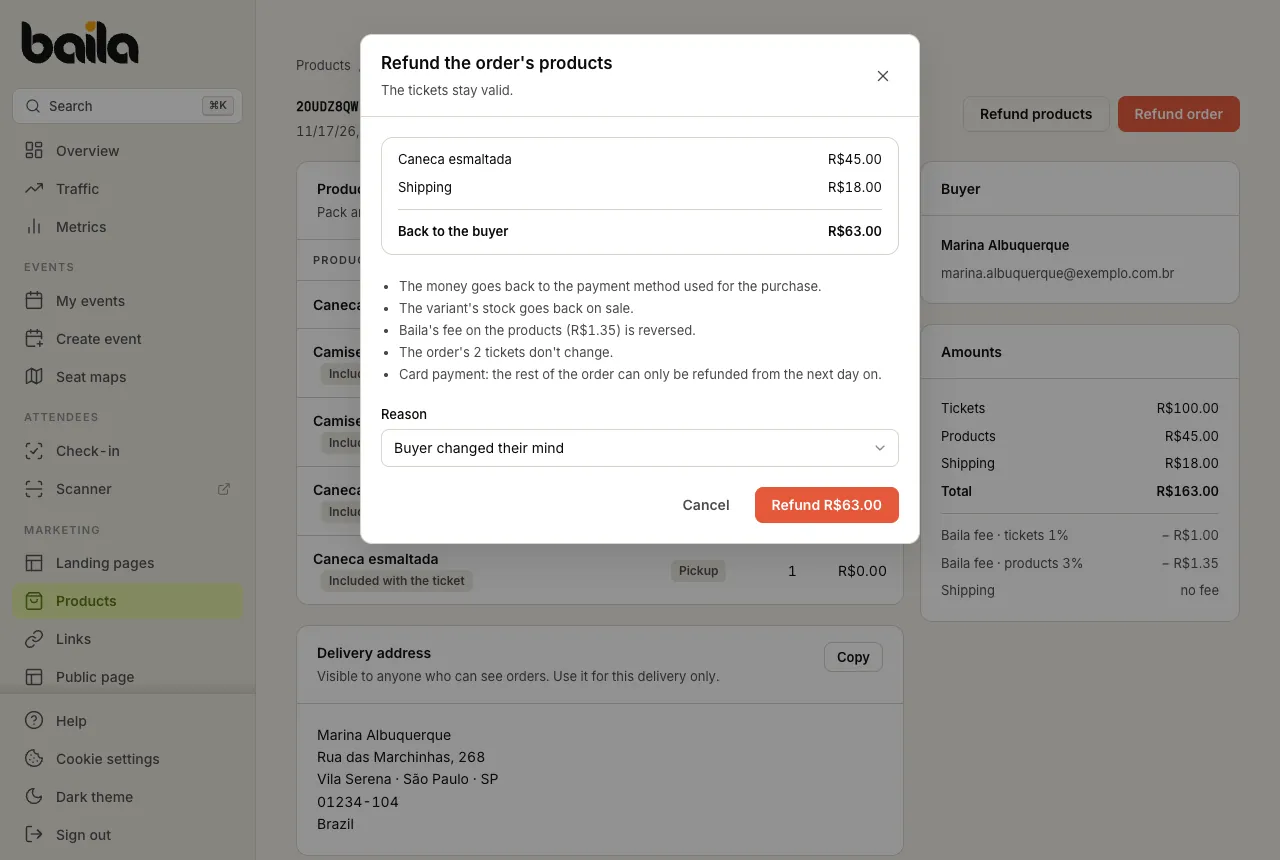
Pick the Reason: Buyer changed their mind, Defective product, Couldn't deliver or Other.
Click the Refund … button, which already shows the amount. Once the refund is confirmed, the items show as Refunded on the order page and the order gets the Products refunded badge in the list.
What happens with a products refund:
| What | Result |
|---|---|
| Money | Goes back to the payment method used for the purchase: every product on the order plus the shipping fee. |
| Stock | The units go back on sale, in the same variant. |
| Baila's fee on the products | Is reversed. |
| Tickets | Don't change: they stay valid for check-in. |
| Buyer | Gets an e-mail with the amount refunded. |
Card payments have one more rule: after refunding the products, the rest of the order can only be refunded from the next day on.
When to refund the whole order
Use Refund order when the buyer gives up on everything. The tickets are cancelled, the products go back in stock and the buyer gets the money back. If the products were already refunded, the order refund returns only what is left.
The products refund isn't available in these cases, and the order page says why:
- Orders paid in installments: for now, only the whole order can be refunded.
- The products are everything that was paid (the tickets were free): refund the whole order.
- Products-only orders: the button is Refund order, which returns everything.
From the event's Attendees tab, refunding the order works as before. The window shows the ticket amount, the products and shipping and, when it applies, the products already refunded. See how to issue a buyer refund from the dashboard.
Items included with a ticket, such as a race kit, are not refunded separately: they are part of the tier price. When the ticket is refunded, the included item goes back in stock with it.
Frequently asked questions
Can I give back only one of the t-shirts on the order? No. A products refund returns every product on the order and the shipping fee at once. For smaller adjustments, agree on it with the buyer.
Where does the refund money come from? From your payment account (Asaas), just like a ticket refund. If there isn't enough balance, the refund is not made and the dashboard tells you.
Does the buyer have to return the product? Baila doesn't handle physical returns. Agree on it with the buyer before refunding.
Related articles
How to sell tickets and products on the same order
Buyers buy a ticket and a t-shirt in one payment, or products alone. See what they see at checkout and where you find the orders, the address and the pickup.
How to issue a buyer refund from the dashboard
Refund buyers straight from the dashboard. Baila asks Asaas for the refund, and the money comes out of your Asaas account.