How to include a catalog item in a ticket tier (kit, t-shirt)
Make every ticket of a tier come with a t-shirt, a kit or another catalog item. The buyer picks the size for each ticket and picks the item up in person.
This is done in the organizer dashboard
A ticket tier can include items from your catalog: a race kit, the race t-shirt, the carnival group's shirt. Every ticket of that tier comes with the item, the buyer picks the size for each ticket and collects it in person. The tier price already covers the item: the service fee and coupons apply to the whole tier price, like on any ticket.
Before you start
- Create the product in your catalog and make it Active. See how to create products.
- Turn on Pickup on the product and fill in Where and when to pick up. Included items are always picked up in person.
- The tier needs a price: free tiers can't include items.
- While the tier is selling, keep the product Active with Pickup on. If you archive the product, set it back to Draft or turn off pickup, the tier keeps selling without the item.
How to include the item
Open the event under My events, go to the Tickets tab and, on the row of the tier that will include the item, click the pencil (Edit lot). When you create an event, the same section shows in the wizard's Tickets step.
Under Includes, click Include a catalog item and pick the product. The list shows active products only; those without pickup show the note Turn on pickup to include it.
Under Qty per ticket, set how many units each ticket comes with (1 to 10). A tier can include up to 5 different products.
Click Save changes.
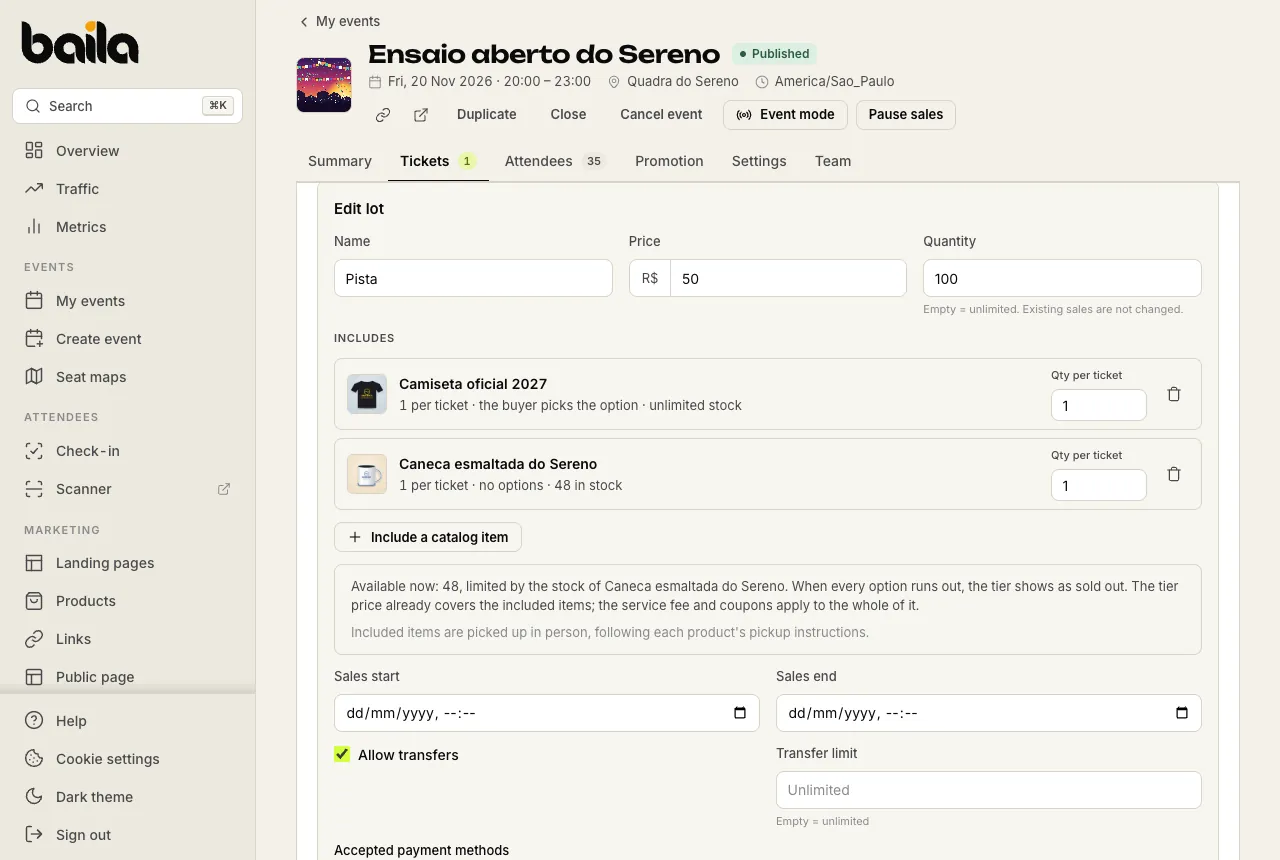
Each item shows whether the buyer picks an option (such as the size) or the product has no options, and how much stock is left. Below, the dashboard says how many tickets are available right now, given the items' stock.
What the buyer sees
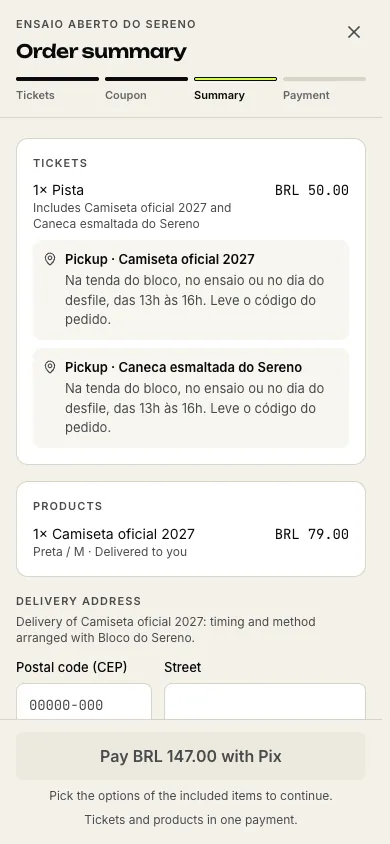
On the purchase page, the tier shows Includes: with the items. In the order summary, each item shows with your pickup text.
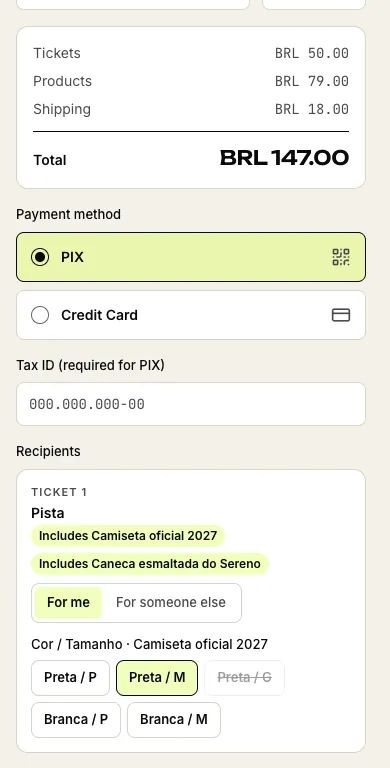
Under Recipients, each ticket shows the item's options, such as color and size. The buyer picks one per ticket: someone buying 3 tickets picks 3 sizes, and a ticket sent to another person carries that person's size. Sold-out options are crossed out. If the product has a single variant, there is nothing to pick.
After the purchase, the ticket shows the item with the chosen option, for example Includes: Camiseta oficial 2027 (Preta / M). Product and option names show exactly as you wrote them in your catalog; in this example they are in Portuguese, and Preta means black. On the order page in the dashboard, the items show as Included with the ticket, with Pickup as the delivery method.
Stock: when the item runs out, the tier sells out
Each ticket sold reserves the item's units in stock, in the chosen option. This changes how the tier counts:
- The tier stays on sale while there are tickets left in the tier and item stock for them.
- When one option runs out (say, size G), buyers can't pick it anymore, but they can pick another.
- When the item runs out in every option, the tier shows as sold out, even if the tier still has tickets left.
A tier that sold out because the item ran out does not open the next tier by itself. Moving on to the next tier still counts only the tier's tickets. To sell again, add stock; to open the next tier, adjust this tier's quantity. The dashboard warns you about this while editing the tier when there is a next tier.
If an order isn't paid in time, the reserved units go back in stock. When a ticket is refunded, its included item goes back in stock with it.
Pickup
The buyer collects the item in person, following each product's Where and when to pick up text, and shows the order code or the ticket. The order page lists the items and each one's option; each person's ticket shows their own (Includes: Camiseta oficial 2027 (Preta / M)).
Frequently asked questions
Can I charge for the kit separately? Yes. Instead of including the item in the tier, sell the product from your catalog and build a landing page with the event and the product. Or create two tiers: one with the kit, priced higher, and one without.
Can I remove the item from a tier that has already sold? Yes, in the same Includes section. People who already bought keep their item; the next tickets come without it.
Related articles
How to create and edit products in your catalog
Add t-shirts, mugs, kits and other items with photos, a price, options such as Size and Color, and stock for each variant. Then edit, duplicate or archive them.
How to set up shipping, pickup and the shop on your public page
Set one flat shipping fee per order, choose Pickup or Shipping for each product, write where to pick up and show your catalog on your public page.